Eat Right in AR

Produced while studying on MA Virtual and Extended Realities at UWE, Bristol
Prototype Unity/Vuforia AR app to give user personalised nutritional info
This was a prototype app to explore AR. Although this project did not result in a full realisation of the concept, I improved my knowledge of AR platforms and design. Prototyping allowed me to “fail fast” and also reminded me that some projects do not need 3D/AR to succeed. This article records the process I went through and tools I used.
Motivation and concept
Why AR?
Having never worked with AR I was keen to experiment with it. There is a wide variety of tools and production methods so I wanted a project that would allow me to understand the range of options for future projects, rather than focus on a specific platform or AR feature. I also wanted to understand how to prototype AR projects.
Concept ideation
I didn’t spend a lot of time thinking about the concept, but I liked how nutritional advice in a running magazine I read was tailored to runners and their goals. I wondered if a similar approach could work for the wider population and their individual health/wellness goals, and if AR could be used to achieve the concept.
Concept
We all know we should eat at least 5 fruit and vegetables a day, but only around half the UK population manage to meet this target. How food choices affect us can be hard to understand. What does choosing an apple over crisps do for me? If we could make the health and wellness benefits of individual foods clearer and more relevant to individuals, would this make people more likely to buy and eat them?
Inspiration
Inspiration for the concept comes from Candide Labels, a now defunct iOS app in which users identified plants via a computer vision machine learning model. The user then placed AR plant labels in their space.
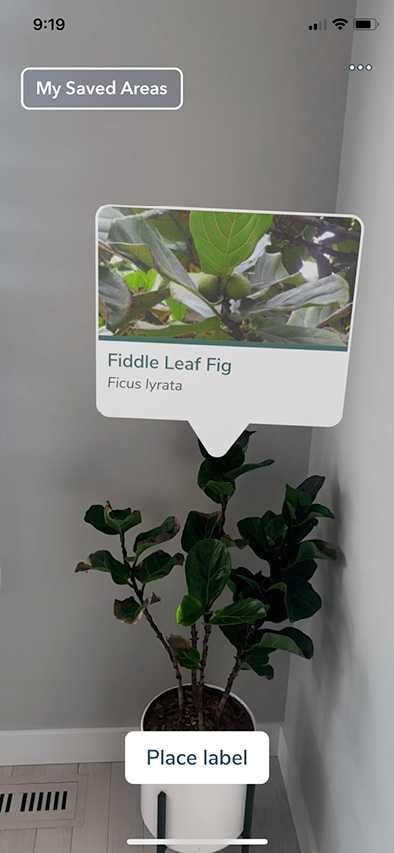 Candide Labels. Image credit: AR/VR tips
Prototyping
Prototyping can be used develop and test the concept, indicating the efficacy of the solution and identifying next steps to test.
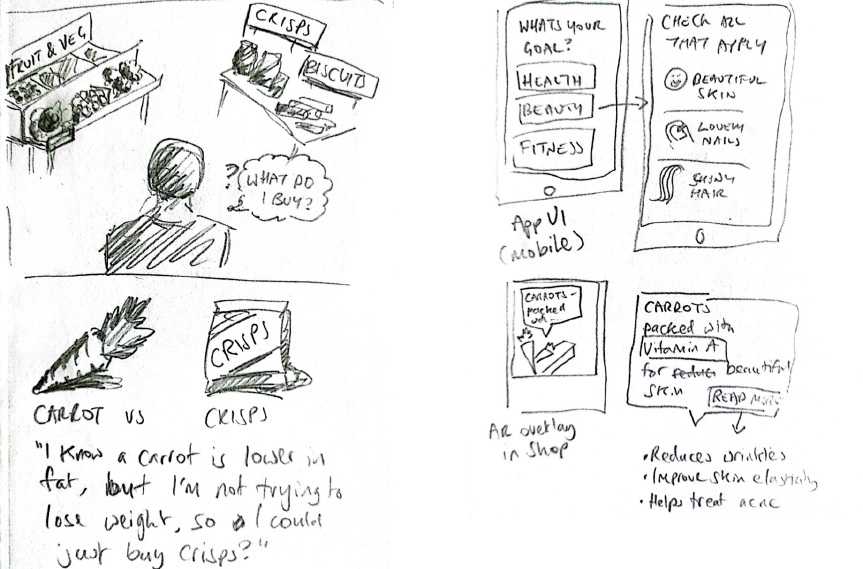 Left: User is faced with the question of what buy at a supermarket, with an internal monologue showing how non-personalised nutritional information can lead to bad choices. Right: Sketch of app UI that would enable personalised nutritional information
Paper prototyping
Lo-fi prototyping gives fast feedback, so I started with paper prototyping to sketch out the user journey.
Rapid user testing
Using physical objects was a fast method of prototyping the 3D space. The test proved the basic user flow could work as it was understood by the user. It also highlighted issues
- How would the recognition of foods as objects in AR work? E.g. image recognition or a printed image target on the food label.
- How will the AR overlays be anchored to food objects?
- Would clicking the overlays be hard (the user in the video clicked the carrots themselves rather than the button on the overlay)
Figma for UI design
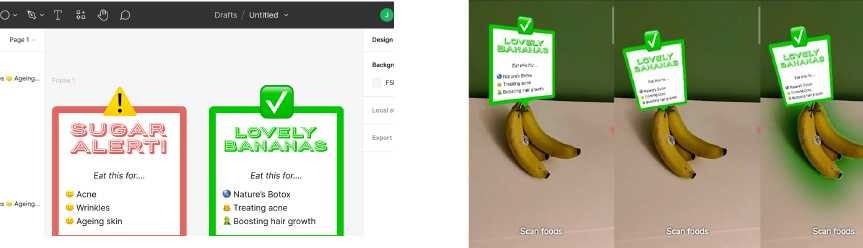
Figma is great for designing UI, here shown are the AR food overlays. Combining this Photoshop allows placing the UI in faux 3D space for testing out how the UI would render on a phone.
Gravity Sketch for 3D prototyping
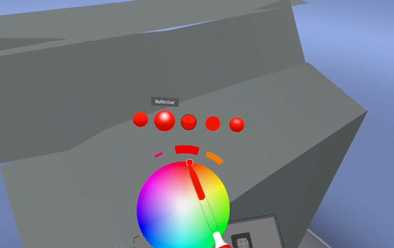
I enjoyed designing a food store environment in Gravity Sketch to test the concept. After learning the controls I found it and more effective than sketching out a 3D scene in Unity:
- You are within the 3D space you are designing, meaning: no need to zoom in/out or pan
- Drawing tools allow sketching out basic 3D objects
Testing key mechanic
XR experiences usually rely on one or more key mechanics, it’s worth identifying and testing these early. Some parts of the concept are more known to me (the app UI for selecting the users goals) and while the AR interaction of identifying a food and displaying an AR overlay above it is less known to me, therefore I need to prototype this. I thought I’d try this with something that would be quick to test.
8th Wall
Niantic 8th Wall is a platform for building Web AR experiences, so avoids needing to build a mobile app. It’s aimed at creative, brand and marketingfull real projects. Features include:
- Sky target: use any sky as canvas for your AR experience
- Image target: make any image the entry point to your AR experience
- Location target: start an AR experience when user visits a specific location, get a 3D model of that location from Lightship VPS to position your experience in
- SLAM/World tracking: automatically recognises users’ physical space; enabling object placement and physics effects
8th Wall target Options
The first part of the mechanic relies on the user scanning the food object with their phone. Once that object has been recognised correctly, its position will need to be tracked via world or SLAM tracking so that the marker is positioned above the object. To recognise something in the user’s viewport, 8th Wall provides the following options:
- Image target (e.g. a photo, label or QR code)
- A public location scanned with Niantic VPS
- Sky effects
- Face effects Both 1 and 2 were relevant options. Looking in to #2 I would have needed to visit a food store and scan it to Niantic Wayfarer myself, I was unsure how this worked so it seemed a bit long for the prototype. #1 seemed feasible to test the idea, so I took photos of food objects and adapted an 8th Wall example to place markers above them
8th Wall for testing key mechanic
The process I used for 8th wall was working within their web dashboard, I setup some image targets and modified some example HTML/JS/A-Frame code then published.
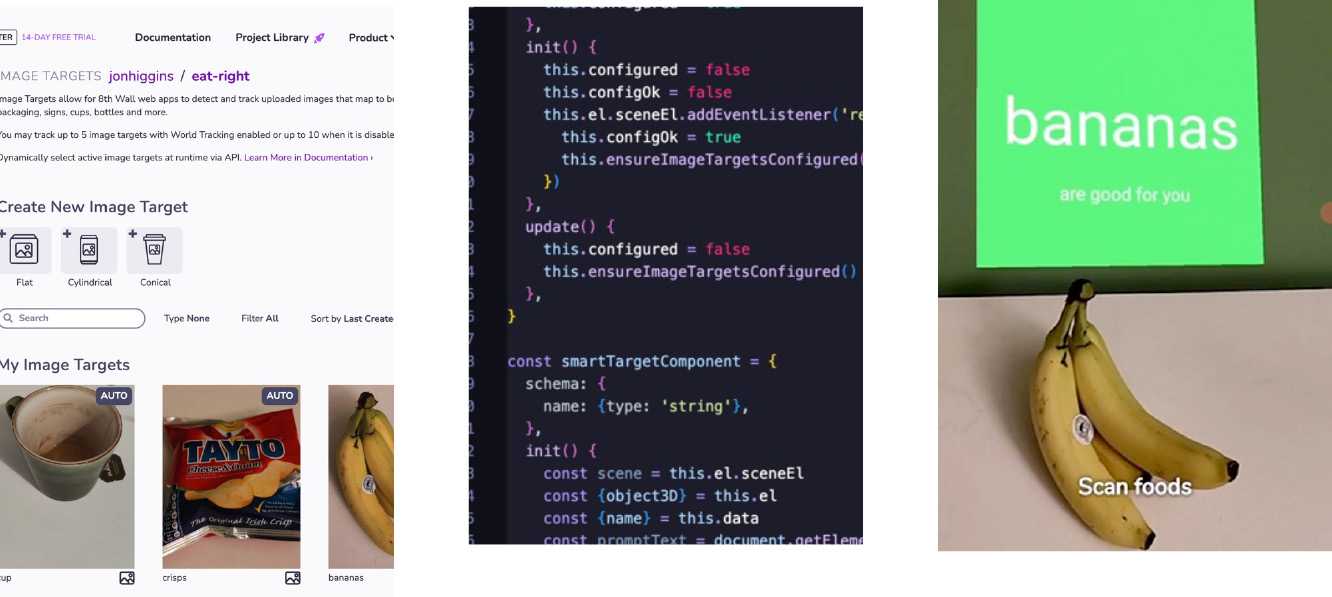
Learnings from 8th Wall Prototype
- Image targets not suitable for things that vary visually
- Image targeting works ok-ish in this prototype. Positioning of the marker needs improving
- I need to either adjust what is targeted or method of targeting
- Target method is a core element of AR experience design 8th Wall platform evaluation Good
- Web-based: easy to distribute and update
- Powerful features
- Low pricing
- Slack community and lots of creative example projects with code Not so good
- Requires technical skills (HTML/JS/A-Frame)
- Poor layout options
- Accessibility issues
Vuforia Engine/Unity for Cloud Recognition
Due to the issues with 8th Wall’s image target I looked at other AR platforms to see if they could achieve the semantic identification of bananas I was looking for. I was also interested in comparing another framework in general. Vuforia is a popular AR platform aimed at large enterprise applications across a variety of industries. There are a lot of Vuforia products and it can be hard to figure out which is relevant, I went with Vuforia Engine marketed as “most widely used platform for AR development, with support for the majority of phones, tablets, and eyewear” Vuforia Engine supported AR targets Images and objects
- Image – 2D photos and images
- Cylinder – 3D cylindrical object with image targets
- Multi Targets - 3D cube object with image targets
- Model Targets - 3D object from CAD model
- Cloud Recognition – Same as image target but supports 10k+ images
- Barcode Scanner – Barcodes and QR codes
- VuMarks – QR code type data in more visually appealing format Environments
- Area Targets - track and augment areas and space of a 3D scanned environment
- Ground Plane
Vuforia Engine/Unity process
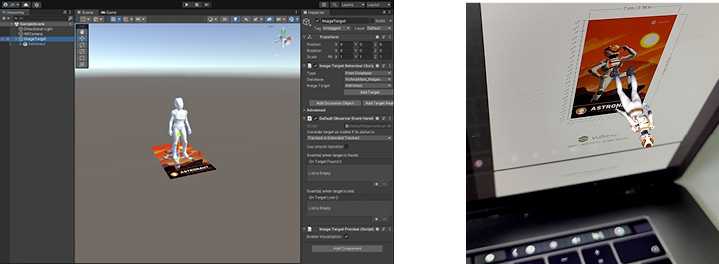
Creating a simple example
using Vuforia’s sample assets is relatively straightforward if you have some Unity experience: it involves signing up, adding the Vuforia asset to a Unity Android/ iOS project and then adding a couple of Vuforia game objects.
- Sign-up on website and create a license key
- Setup Unity project to build to Android/iOS
- Add Vuforia Engine asset to Unity project via Asset Store / Package Manager
- Add Vuforia AR camera, configure with license key and remove existing camera
- Add Vuforia Image Target, configure with image asset
- Add a child 3D object to the Image Target that is shown when target is triggered
Image target issues
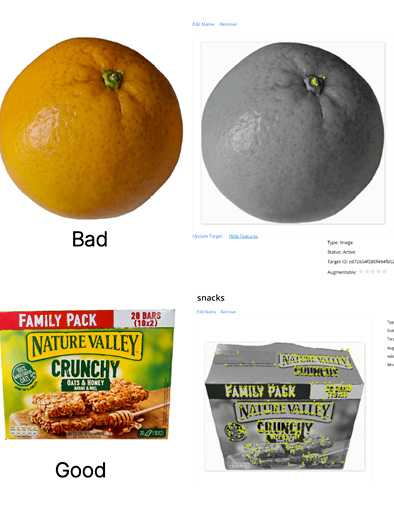
When using image targets, Vuforia’s computer vision find some images much easier to recognise than others. It helpfully provides feedback in the web dashboard on uploaded images rating them 0-5 stars and showing “features” it identifies in the images. The more features in an image, the easier to identify. The best images are: rich in detail, high in contrast and have no repetitive patterns. My fruit images proved problematic and scored 0 stars.
Good images:
- Rich in detail
- High in contrast
- Not repetitive patterns
Facepalm time / Unity process
I really struggled to get Vuforia to recognise anything other than its example images, even after spending time optimising my target images to 5 stars. I tried lots of things for many hours… Until I realised in Unity I was building the Vuforia sample scene to my phone instead of the scene I was editing. Following that I adopted a more methodical Unity approach:
- Create Unity project
- Add a 3D cube or primitive to the scene and save it
- Set build target (e.g. Android)
- Check it builds to target OK (e.g. test on mobile device)
- Commit and push to Git This provides a stable base to make additional changes, repeating steps 4 & 5 after significant changes in the Unity project. This way if there are build errors they can be isolated to the last change. Vuforia Engine sketch
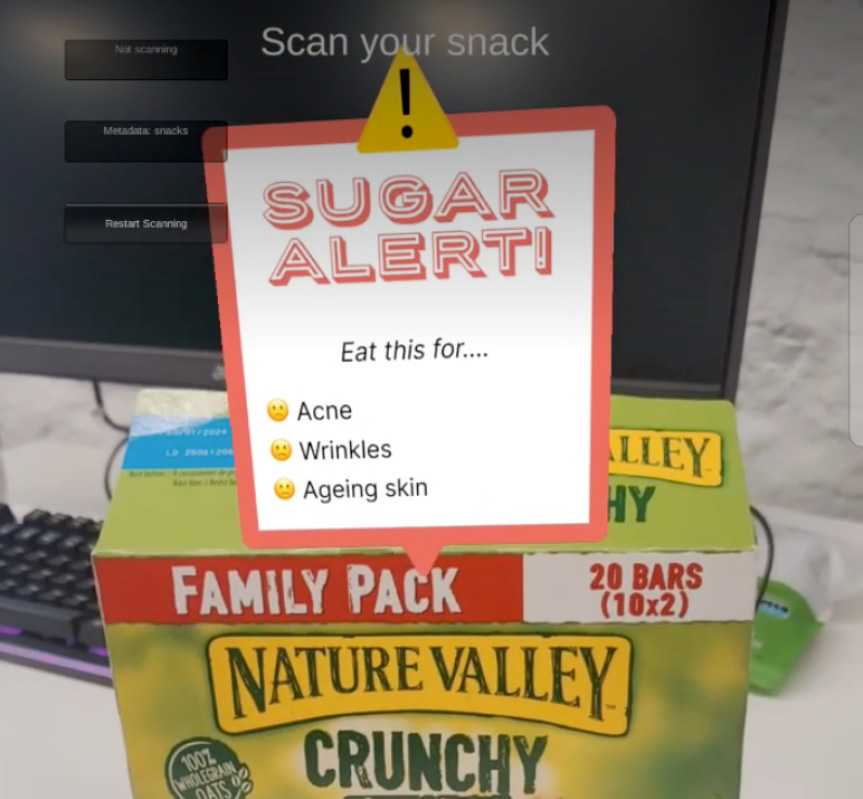
- I updated the example to test my concept:
- Uploaded fruit and snack images to Vuforia target manager. Tagged them with metadata of ”banana” or “snack”
- Switched AR camera to Cloud Recognition
- Added UI image overlays I made earlier in Figma
- Added a C# script that displays the UI image overlay if an image target with “banana” or “snack” metadata is found
Vuforia Learnings
- An Image Target is not suited to targeting a 3D object, its meant for a 2D image/photo
- Vuforia Cloud Recognition does not have a machine learning aspect (e.g. it cannot semantically understand what a banana is after seeing many photos of one)
- Combining ML image recognition with 3D object recognition is possibly an unsolved problem?
Next steps
- If AR and 3D space is important and experience can be limited to a specific store: use Area Targets to place AR overlays above different food sections in the food store
- If recognition of food objects is important and it should work in any shop: use 2D image recognition and use 2D UI elements
Although this project did not result in a realisation of the concept, I did improve my knowledge of AR platforms and design. Prototyping allowed me to “fail fast” and also reminded me that some projects do not need 3D/AR to succeed. I would use both 8th Wall and Vuforia Engine again if they suited the project, I am also keen to try ARFoundation for Unity in the future.